

In 2026, video is no longer just a content format it’s the backbone of the digital economy. From YouTube automation channels and short-form TikTok clips to online courses, brand storytelling, and digital marketing campaigns, video content has become the most powerful medium for communication and monetization. However, while cameras and smartphones have made recording easier than ever, the real magic happens in post-production. Editing is where ideas are shaped, emotions are enhanced, and raw footage transforms into something compelling.
Video editing software is not just a technical tool it is the creative engine behind every successful creator, business, and media brand. The right editing program can dramatically increase your productivity, improve your storytelling, and even open doors to new income opportunities. But the challenge in 2026 is not access. It is choice. There are dozens of programs available, each promising professional results, AI automation, and cinematic quality. The real question becomes: which one fits your goals, skills, and ambitions?
Adobe Premiere Pro – The Professional Powerhouse
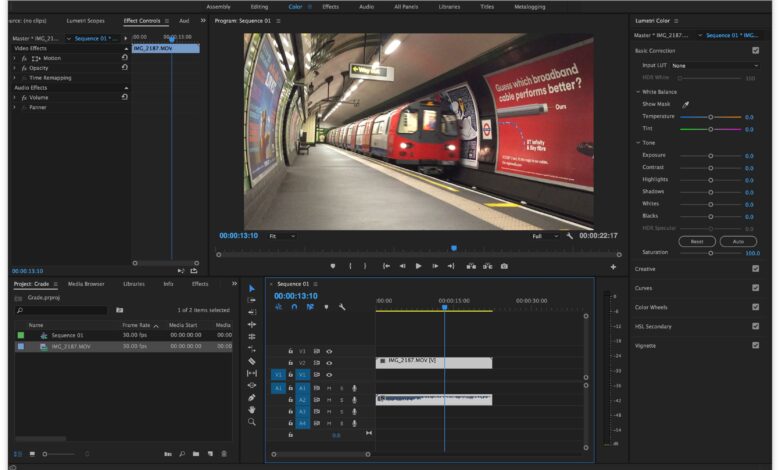
Adobe Premiere Pro remains one of the most powerful and respected video editing programs in the world. In 2026, it continues to dominate professional environments ranging from YouTube studios to Hollywood production houses. What makes Premiere Pro exceptional is not just its feature list, but its flexibility. It allows editors to control every element of their project — from frame-accurate cuts to cinematic color grading and advanced audio engineering.
Premiere Pro operates on a timeline-based editing system that gives full control over video layers, transitions, and effects. Editors can work with multiple camera angles, synchronize audio with precision, and apply detailed adjustments to brightness, contrast, saturation, and color curves. The software integrates seamlessly with Adobe’s ecosystem, particularly After Effects for motion graphics and Photoshop for graphic overlays. This interconnected workflow makes it a powerful solution for agencies and high-level creators who require professional consistency.
However, Premiere Pro is not beginner-friendly. The interface can feel overwhelming at first, and mastering it requires patience and practice. Additionally, it operates on a subscription model, meaning users must pay monthly or annually. For professionals, this cost is justified by the output quality and workflow efficiency. For beginners, it may feel like an investment that should come later in their journey.
Premiere Pro is best suited for serious creators, filmmakers, marketing agencies, and freelance editors who want complete control and industry credibility.
Final Cut Pro – Speed and Optimization for Mac Users
Final Cut Pro is Apple’s professional editing software designed specifically for macOS. Its greatest strength lies in optimization. Because it is built exclusively for Mac hardware, it runs smoothly and renders videos faster compared to many cross-platform competitors. This efficiency makes it extremely popular among YouTubers and content creators who prioritize speed without sacrificing quality.
One of its most distinctive features is the Magnetic Timeline. Unlike traditional track-based editing, clips automatically snap into place, reducing timeline chaos and preventing accidental gaps. This system speeds up workflow and simplifies organization. The software also offers advanced color grading, HDR support, 360-degree video editing, and strong audio tools.
Unlike subscription-based platforms, Final Cut Pro requires a one-time payment. This can be financially attractive over the long term. However, it is only available for Mac users, which limits accessibility.
Final Cut Pro is ideal for creators deeply integrated into the Apple ecosystem who want professional capabilities combined with high performance and a streamlined interface.
CapCut – Fast, Viral & AI-Driven Editing
CapCut started as a mobile editing app but has evolved into one of the most influential editing platforms in the short-form content world. In 2026, it plays a crucial role for TikTok creators, Instagram Reel producers, and YouTube Shorts editors.
The software focuses on speed and automation. Built-in templates allow creators to produce trending-style videos within minutes. Auto-captioning features generate subtitles instantly, increasing engagement and accessibility. AI-powered effects enhance faces, remove backgrounds, and apply cinematic filters with minimal effort.
CapCut is beginner-friendly and intuitive. Users do not need technical knowledge to create visually appealing content. While it may not offer the depth of professional desktop editors, it excels in content velocity. For creators focused on growth, consistency, and algorithm-friendly content, CapCut offers a strategic advantage.
It is best suited for social media creators, faceless YouTube automation channels, and beginners entering the content space.
Wondershare Filmora – Beginner to Intermediate Bridge
Filmora occupies a unique position between beginner-friendly simplicity and semi-professional capability. Its interface is clean, intuitive, and easy to learn. Drag-and-drop editing, pre-built transitions, and a large library of effects make it accessible for those who are new to editing but want more control than mobile apps provide.
The software includes features such as motion tracking, split-screen editing, keyframing, and audio equalization. While it does not match the depth of Premiere Pro or Final Cut Pro, it provides enough flexibility for YouTubers, online educators, and small business marketers.
Filmora is often chosen by creators who want professional-looking results without spending months learning complex workflows. It represents a comfortable middle ground in the editing ecosystem.
DaVinci Resolve – Hollywood-Level Power (Even Free)
DaVinci Resolve is widely regarded as one of the most powerful video editing platforms available today. Originally known for its advanced color grading tools, it has evolved into a complete editing suite that includes video editing, visual effects, motion graphics, and professional audio production.
What makes DaVinci Resolve extraordinary is that its free version is incredibly powerful. Users gain access to professional-grade editing tools without paying subscription fees. The paid Studio version unlocks additional AI-based features and advanced capabilities.
The software operates through different “pages” or modules — Edit, Color, Fusion, and Fairlight — each dedicated to a specific aspect of post-production. While this structure provides immense control, it also introduces complexity. Beginners may find it intimidating initially.
DaVinci Resolve is ideal for creators who are serious about cinematic quality and willing to invest time in mastering a powerful system.
Descript – Editing Reinvented Through Text
Descript introduces a completely different approach to editing. Instead of focusing primarily on timelines, it allows users to edit video and audio by editing text transcripts. When you delete a sentence from the transcript, the corresponding video segment is removed automatically.
This innovation drastically reduces editing time for interviews, podcasts, and educational content. Descript also offers AI voice cloning, screen recording, and automatic filler word removal.
While it may not replace traditional editors for cinematic projects, it represents the future of efficient content production. It is particularly valuable for creators focused on talking-head videos, online courses, and podcast distribution.
Pictory – Script-to-Video Automation
Pictory is part of the AI revolution in content automation. It transforms written scripts into fully edited videos by automatically selecting stock footage, adding transitions, and generating subtitles.
For creators running faceless YouTube channels or repurposing blog content into video format, Pictory offers massive time savings. While it may not deliver cinematic customization, it excels in efficiency and scalability.
It is best suited for automation-driven businesses and high-volume content strategies.